

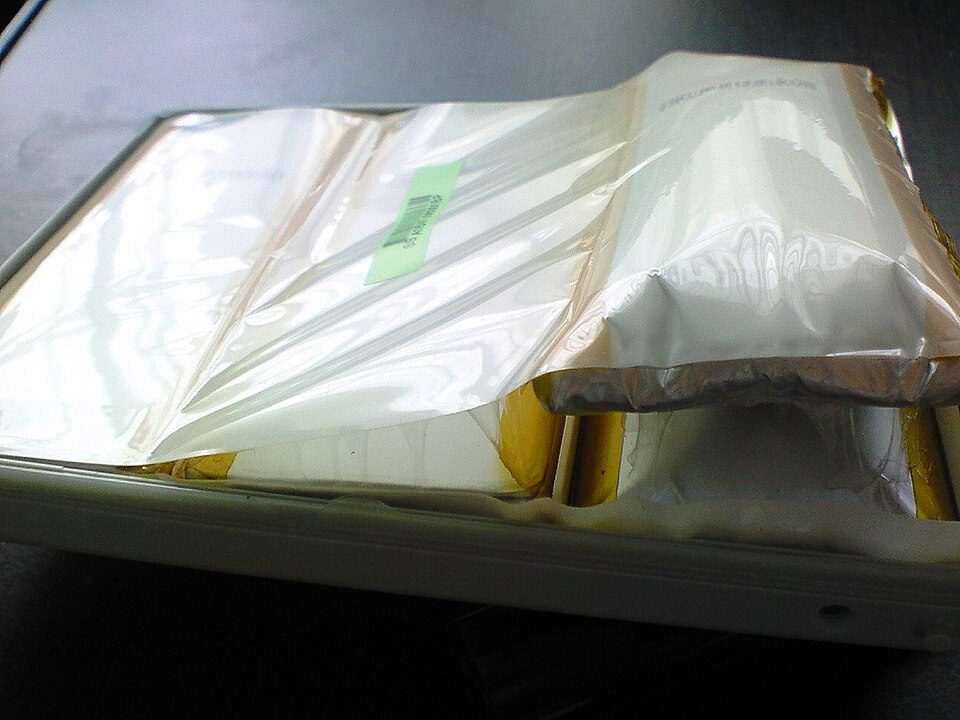

Treat a swollen, hot or smoking laptop battery as damaged: stop using it and ask the maker how to handle it. The FAA says thermal runaway in a damaged lithium-ion battery can start without warning, and the EPA says lithium-ion batteries do not belong in household trash or municipal recycling bins.
For ordinary wear, Apple says ambient heat above 35 °C can permanently reduce battery capacity in its devices, and Apple’s Macs offer a charge limit. Where a point is our own reading rather than a source’s, the page says so.
DellOne2One is an independent publication. It has no affiliation, partnership, sponsorship or relationship of any kind with Dell Inc. or Dell Technologies, and is not endorsed by them. Dell and all related product names and logos are trademarks of Dell Inc. and are used here only to identify products and history.
How can you tell a laptop battery is failing?
Swelling and heat carry real risk, while shrinking runtime is what ageing looks like, according to Apple.
| Sign | What it can mean | What to do | Source |
|---|---|---|---|
| A swollen pack can push on the case: gaps, a raised trackpad, a laptop that rocks on a flat desk (our description) | A swelling cell. Wikipedia says thermal runaway can lead to swelling, heat and fire. | Stop using the laptop. | Wikipedia, Lithium-ion battery |
| Overheating, smoke or burning | The FAA tells passengers to alert the flight crew immediately about a device that is overheating, expanding, smoking or burning. | Treat it as an emergency. Away from a plane, leave the area and call your local emergency number (our advice). | FAA, PackSafe lithium batteries |
| Runtime keeps shrinking | Ageing. Apple says a laptop battery’s charging capacity gets smaller as it ages chemically. | Run powercfg /batteryreport and read the report. | Apple Support, Microsoft Learn |
| A frayed, cracked or hot charger (our examples) | Wikipedia says faulty chargers can destroy a battery’s protection circuit. | Stop using that charger and ask the maker for a replacement. | Wikipedia, Lithium-ion battery |
Microsoft says the battery report covers usage over the life of the system and saves as an HTML file in the current folder.
What makes a laptop battery swell or overheat?
The FAA lists damage, overheating, water, overcharging and bad packing as triggers for thermal runaway. It can also happen on its own, from manufacturing defects.
Wikipedia describes lithium plating, where metallic lithium deposits on the anode. Low temperatures, overcharging and high charging rates make it worse, and dendrites can then pierce the separator and start thermal runaway.
What did the 2006 Dell recall teach about battery fires?
It showed that the cause can sit inside the cell, and that makers and suppliers can disagree about it. After the “flaming notebook” incident in Osaka, the blog Dell ran at this domain responded on July 13, 2006.
Lionel Menchaca’s post, “Flaming Notebook,” said Dell replaced the customer’s computer and “We think it was a fault in a lithium ion battery cell.” Engineers were working with the Consumer Product Safety Commission and a third-party lab, and the cause was still under investigation. Read the archived post and its comments.
Wikipedia says a recall followed in August 2006, and its cited headline gives 4.1 million Sony-made batteries. A Sony spokesman said the problem was the combination of battery and a Dell-specific charger.
Wikipedia’s lithium-ion article says about 10 million Sony cells were recalled across Dell, Apple, Lenovo, Toshiba and others, because metal particles from manufacturing could pierce the separator.
A reader comment on the Dell post calls One2One a newly launched blog. See our history of the Dell One2One blog and the One2One video archive.
Which charging habits help, and which advice is unproven?
| Habit | Documented effect | Source |
|---|---|---|
| Keep the laptop below 35 °C ambient (Apple’s figure for its devices) | Apple says ambient temperatures above 35 °C can permanently damage battery capacity. | Apple, maximizing performance |
| Charge between 0 and 45 °C | Wikipedia says many lithium-ion cells cannot be charged safely below 0 °C because lithium plates onto the anode, and that charging above 45 °C degrades performance. | Wikipedia, Lithium-ion battery |
| Use a charge limit | Apple says its Mac Charge Limit can be set between 80 and 100 percent, and that cutting time spent fully charged reduces wear. We name no Windows equivalent because we could not read those makers’ documentation. | Apple Support |
| Store at about 50 percent | Apple says a battery stored fully discharged can fall into a deep discharge state and be unable to hold a charge, and one stored fully charged may lose capacity. | Apple, maximizing performance |
We found no source for exact yearly capacity-loss figures or lifespan multipliers for charge limits, so we give none.
What should you do if the battery is swollen?
- Shut the laptop down, unplug it and stop using it. The FAA says a damaged battery can go into thermal runaway without warning, so we treat a swollen pack as damaged. That reading is ours.
- Do not press, pierce or try to deflate it. The EPA says batteries that are damaged or crushed create a fire hazard.
- Contact the maker. The EPA says to ask the manufacturer for specific handling information when a battery is damaged.
- Keep it out of household trash and recycling. Use a certified electronics recycler or a retailer takeback; the EPA names Earth 911 and Call2Recycle as locators, on its used lithium-ion batteries page.
- Do not take it on a plane. The FAA says damaged or recalled batteries and devices that are likely to create sparks or dangerous heat must not be carried aboard unless the battery has been removed or made safe.
- If it smokes or burns, leave the area and call your local emergency number. That is our advice; Wikipedia says smoke from thermal runaway is flammable and toxic.
We give no extinguisher advice, because we found no named authority we could read that backs a specific extinguisher type.
What are the airline rules for laptop batteries?
| Rule | What the FAA says | Source |
|---|---|---|
| Spare batteries | Carry-on only, with terminals protected from short circuit. | FAA PackSafe |
| Size limit | Up to 100 Wh per lithium-ion battery; with airline approval, up to two spares of 101 to 160 Wh. Many airlines may set stricter limits. | FAA PackSafe |
| Damaged or recalled | Damaged or recalled batteries and devices that are likely to create sparks or dangerous heat must not go in carry-on or checked bags unless the battery is removed or made safe. | FAA PackSafe |
When should you replace a laptop battery?
Replace it when the battery report shows a large capacity loss, or at once if it swells.
Apple says all rechargeable batteries are consumable components that become less effective as they age, and the EPA says not all batteries are removable or serviceable by the user. Check our right to repair guide for laptops before opening a case, and the terms in our extended warranty guide.
We found no source for a warranty rule or per-brand replacement prices, so ask your maker for a quote and its warranty position.
Older guides use a wmic command to find the battery model. Microsoft’s deprecated features list says WMIC is removed and no longer available as a Feature on Demand in Windows 11, version 24H2 and above, and names PowerShell for WMI as its replacement. Use the model label or your maker’s support page instead.
If the laptop runs hot with a healthy battery, see how to fix a slow laptop and removing bloatware from a new laptop.
What could we not verify?
We could not open the CPSC site or Dell’s recall notice, so 4.1 million rests on a headline Wikipedia cites. We did not watch the FAA video or confirm the labels inside the battery report.
We also give no temperature thresholds, cycle counts or charge-limit product names beyond those cited above, because no named source backed them.
Frequently asked questions
Is it safe to use a laptop with a swollen battery?
No. The FAA says thermal runaway in a damaged battery can occur without warning, and we read a swollen pack as damaged. Shut the laptop down, unplug it and contact the maker for handling instructions, and keep it out of household trash.
How long do laptop batteries last?
Makers typically specify cycle life as the number of full cycles until capacity falls to 80 percent of its rated value, according to Wikipedia. Apple says age depends on temperature history and charging pattern, so no fixed number of years applies. Use the battery report to measure your own.
Does keeping a laptop plugged in damage the battery?
Time at full charge wears the cells. Wikipedia says storing lithium-ion batteries charged reduces capacity, and Apple built Optimized Battery Charging to reduce time spent fully charged. If your laptop’s maker offers a charge limit, use it and read its documentation for how the limit works.
What temperature is too hot for a laptop battery?
Apple says ambient temperatures above 35 °C can permanently damage battery capacity in its devices, and Wikipedia says charging above 45 °C degrades performance. Neither is a surface-temperature limit, and we found no named source for one, so we give none.
Featured image: a swollen 15-inch MacBook Pro battery. Photo by flickr user sparti24, Wikimedia Commons, CC BY-SA 2.0.